

A PIM data model is the structure your product information sits in. It sets which families of products you sell, which attributes each family needs, how variants relate to their parent product and how products link to each other.
Design the model before you import any data. Every import and channel export depends on it, so changing the structure later means remapping both.
What is a PIM data model?
A PIM data model defines how product information is organized in a product information management (PIM) system. It's the plan for the data, and your PIM stores every product record in that structure.
Most PIM data models have these parts:
- Families: groups of products that share the same set of attributes, such as headphones or laptops.
- Attributes: the fields each product carries, such as battery life or screen size, each with a data type and, where needed, a unit or a list of allowed values.
- Product models and variants: a parent product that holds what all its versions share, and variants that hold what differs, such as color.
- Categories: the tree shoppers browse, such as Audio > Headphones > Over-ear.
- Relationships: typed links between products, such as accessories and replacement parts.
- Assets: images and spec sheets linked to a product or a variant.
- Locales and channels: the languages and sales channels each value applies to.
How is a product family different from a category?
Both are groups of products. A category is customer-facing: it groups products by where shoppers find them on your site, like an aisle in a store. A family is internal: it groups products by the fields your team needs to fill in, so every product in a family gets the same set of attributes.
A pair of wireless headphones can sit in two categories at once, such as Audio > Headphones and a seasonal Travel category. It belongs to one family, Headphones, so it needs the same fields as every other pair, such as battery life and noise cancellation.
The two don't line up one to one:
- One category can hold several families. A Travel category may include headphones and chargers, and each needs its own fields.
- One family can sit in several categories. Over-ear headphones and earbuds may sit in different categories but share the Headphones family, because they need the same fields.
| Category | Family | |
|---|---|---|
| What it decides | Where the product appears on your site | Which fields the product needs |
| How many per product | Can be several | One |
| Who uses it | Shoppers browsing your site | Your team filling in product data |
| How often it changes | Often, with merchandising and seasons | Only when the product data changes |
| Example | Audio > Headphones > Over-ear | Headphones: connectivity, battery life, noise cancellation, color |
Keep the two separate. If your families copy your category tree, every merchandising change forces a change to your product data. Our guide to product taxonomy covers how to build the category tree.
How do you design a PIM data model?
1. Audit where your data comes from and where it goes
Start with the data you have. List the systems and files your product data comes from today, such as your ERP and supplier spreadsheets, and note which system owns each field. Price and stock usually come from the ERP, and the PIM holds descriptive and marketing data. Our guide to PIM vs ERP covers the split.
Then list every place your product data goes, such as your own site, marketplaces, retailer portals and print catalogs. Each one has required fields. Google Merchant Center asks for a GTIN when the manufacturer has assigned one, and Amazon requires specific attributes for each product type.
The model has to hold everything these channels need. Write down the owner of each field too, so an import from one system doesn't overwrite values that belong to another.
2. Group products into families
Put products in the same family when they need the same attributes. Headphones need fields like battery life and noise cancellation. Laptops need screen size and processor. Phone cases need the phone models they fit. Chargers need wattage and connector type.
Keep families broad. When a few products need an extra field, make that field optional instead of creating a new family. Wired headphones can stay in the Headphones family and leave battery life empty, and studio headphones can fill in an optional impedance field that earbuds skip. Create a new family only when products need mostly different fields, such as headphones and laptops.
Avoid one catch-all family. When every product carries every attribute, most fields sit empty and completeness scores stop telling you anything.
3. Define each attribute
For every attribute, decide:
- Data type: text, number, yes/no, single select, multi-select, date or asset. Store measurements as numbers with a unit, so filters can sort and compare them.
- Unit: one unit per attribute, such as hours for battery life or watts for charger output.
- Allowed values: a fixed list for anything shoppers filter on, so "BT" and "Bluetooth" don't end up as two separate filter options.
- Required for: the channels that need the attribute before a product can go live. Work back from your product page and each channel's rules, and make an attribute required only where something downstream needs it.
- Scope: where the value applies.
Scope is easy to get wrong. Weight is the same everywhere. Product names and marketing copy change by language. Compliance text can change by market. A marketplace title applies to one channel only. If a channel-only value is stored as a global one, it publishes everywhere.
Group attributes into attribute groups, such as technical specs and content, so each team can find and own its fields. The template further down shows these decisions for a headphones family.
4. Decide your variant structure
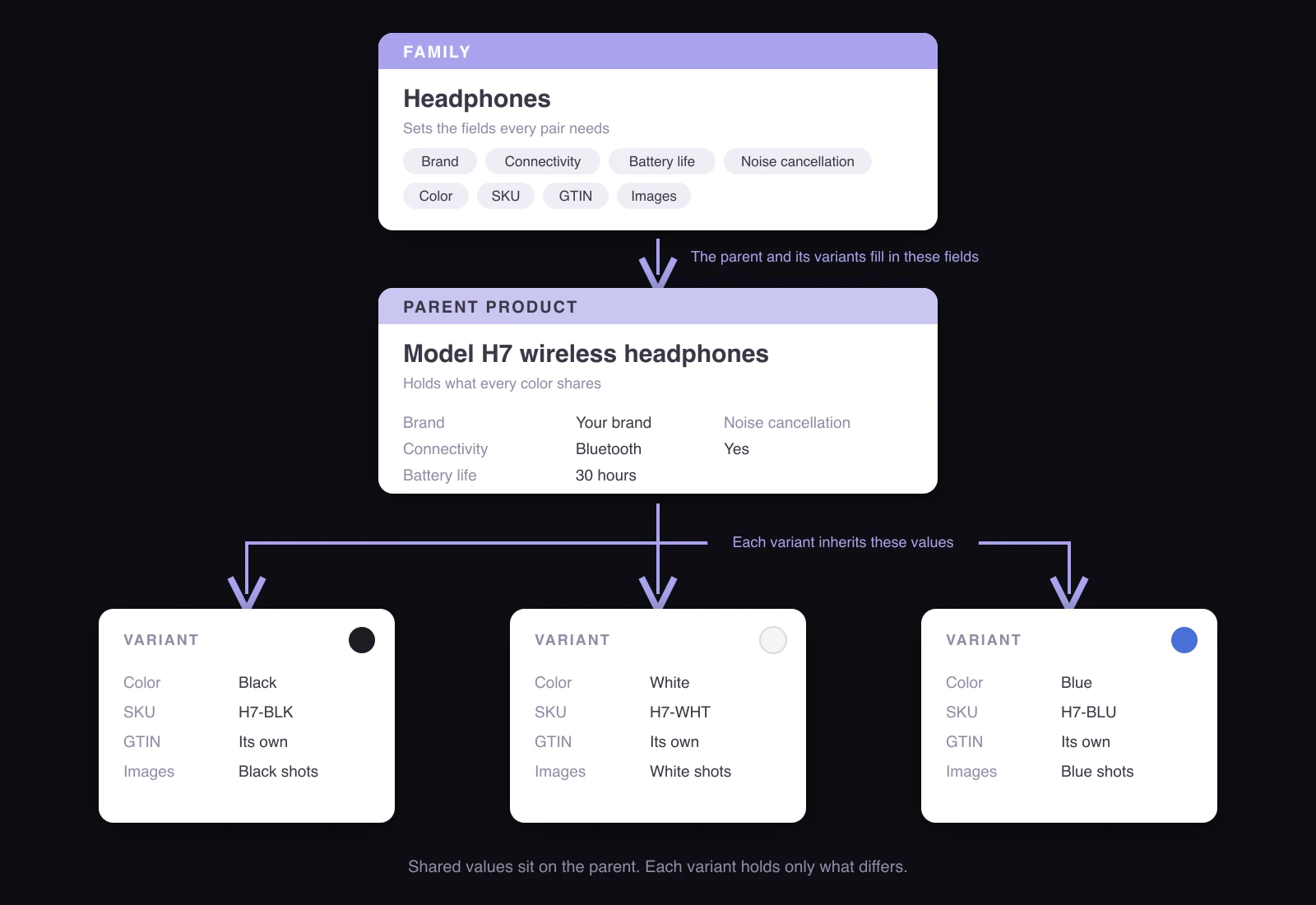
A variant is a version of the same product that a shopper chooses between, and it has its own SKU. The parent, sometimes called a product model, holds what all versions share.
Decide two things for each family:
- Variant axes: the attributes that create variants, such as color for headphones, or RAM and storage for laptops.
- Levels: one level when there's one axis. Two levels when there are two, such as apparel by color and then by size, where images belong to the color and the GTIN belongs to the size.
Check your PIM's limits and your channels' limits before you commit. Some PIMs allow up to two levels of variants, and Shopify allows up to 2,048 variants and three options per product.
Options a shopper picks at checkout, such as engraving, usually aren't variants. Modeling them as variants can create a SKU for every combination.
5. Set inheritance rules
Inheritance means a value set on the parent applies to every variant below it. Set brand and battery life once on the headphones parent, and every color variant inherits them. When a value changes, you update it in one place.
Two rules keep inheritance clean:
- Let variants override only where they really differ. A white version may weigh a few grams more because of a different finish, so weight can be overridden on that variant.
- Mark identifiers as non-inheritable. Each variant needs its own SKU and GTIN.
Inheritance applies to content too. Our guide to product variant descriptions covers which descriptions can be shared across variants and which need their own.
6. Model relationships as links
Relationships connect separate products, such as accessories, replacement parts, compatible models and bundles. Store them as typed links between products.
A phone case linked to the phone models it fits can show a "fits your phone" message on the product page. The same link helps AI shopping agents match the case when a shopper names their phone.
In spreadsheets, related products often sit in one column as a list of SKUs, such as "CASE-201, CASE-202". Carried into a PIM as plain text, that list can't be filtered or shown as links on the product page, and it goes out of date when a SKU changes.
7. Keep identifiers separate
Keep each identifier in its own field. Your SKU is your internal code. The GTIN is the barcode number Google and marketplaces match on. The MPN is the manufacturer's part number. If you sell on Amazon, the ASIN is a fourth.
A common shortcut is to use one number for everything, such as the supplier's part number as your SKU. That can break when two suppliers use the same part number, or when a channel asks for a GTIN you haven't stored.
8. Test with real products before you import
Load a sample of real products before you commit, including your product with the most variants and a product from your messiest supplier file. Export them to each channel and check what's missing or in the wrong place.
Fixing the model at this stage takes a few edits. Fixing it after a full import means remapping every record.
Which attributes go on the parent product and which on the variant?
Put an attribute on the parent when every variant has the same value. Put it on the variant when it changes between versions or identifies the version.
Take a laptop sold in different RAM and storage configurations. This is what the split might look like:
| Laptop attribute | Level | Why |
|---|---|---|
| Brand | Parent | The same for every configuration |
| Screen size | Parent | Each screen size is its own product (see below) |
| Processor | Parent or variant | Variant if configurations come with different processors, otherwise parent |
| RAM and storage | Variant | These are the variant axes |
| SKU and GTIN | Variant | They identify the version |
| Price | Variant | Changes by configuration, usually owned by the ERP |
| Images | Parent | The configurations look the same, so they share images |
When should a variant be a separate product?
Make it a separate product when:
- It needs different attributes from its siblings.
- Shoppers would describe it differently or use it for something else.
- It belongs in a different category.
A laptop with 16 GB or 32 GB of RAM can be two variants of one product. A 14-inch and a 16-inch model from the same laptop line may work better as separate products if their weight and battery life differ, since shoppers compare them as different machines.
What are the most common PIM data model mistakes?
- Using the category tree as your families. Categories change with merchandising. Families should change only when the product data changes.
- One family for everything. If every product uses the same family, each product carries fields that don't apply to it. Most of them sit empty, and completeness checks stop being useful.
- Free text for values shoppers filter on. If one supplier enters "BT" and another enters "Bluetooth", your Connectivity filter shows two options for the same thing. Shoppers who pick one miss the products listed under the other.
- Related products typed into a text field. They can't be filtered or shown as links.
- Channel-specific copy in global fields. A marketplace title can end up on your own product pages.
- Checkout options modeled as variants. Engraving or gift wrap can multiply your SKU count.
How do you keep a PIM data model up to date?
A data model drifts as attributes get added for one supplier or one channel. Keep it current with:
- One owner who approves every new attribute or family.
- A written model that lists families, attributes, rules and the reason behind each decision.
- A review whenever you add a channel or a product line.
For the wider rules on who can change product data, see our guide to PIM data governance.
What does a PIM data model template look like?
Use one row per attribute for each family. This example is for a headphones family.
| Attribute | Group | Data type | Unit or allowed values | Level | Scope | Required for |
|---|---|---|---|---|---|---|
| Brand | General | Single select | Your brand list | Parent | Global | All channels |
| Product name | General | Text | None | Parent | Locale | All channels |
| Description | Content | Text | None | Parent | Locale | Your site, marketplaces |
| Connectivity | Technical | Single select | Bluetooth, wired | Parent | Global | All channels |
| Noise cancellation | Technical | Yes/no | None | Parent | Global | Your site |
| Battery life | Technical | Number | Hours | Parent | Global | Your site, marketplaces |
| Color | Technical | Single select | Your color list | Variant (axis) | Global | All channels |
| GTIN | Identifiers | Text, 8 to 14 digits | None | Variant | Global | Google Merchant Center, marketplaces |
| Main image | Assets | Asset | None | Variant | Global | All channels |
| Marketplace title | Content | Text | Character limit set by the marketplace | Parent | Channel | That marketplace only |
Add a column for the source system if fields come from different places, such as your ERP or a supplier file.
How does Hypotenuse AI help you set up and run a PIM data model?
| Task | How Hypotenuse AI helps |
|---|---|
| Families, variants and relationships | Organizes products into families, variants and related products, in a model that grows with your catalog. |
| Mapping supplier data to your attributes | Brings supplier data into your own attributes, whatever format it arrives in. |
| Units and allowed values | Keeps units and values consistent across every supplier. |
| Categories | Puts every product in the right category for your site and for each channel. |
| Missing attributes | Fills in missing attributes across your catalog. |
| Checks before publishing | Catches missing or incorrect data before products reach your channels. |
| Changes to the model | Controls who can change product data, with approvals before changes go live. |
See how Hypotenuse AI works as a PIM.
FAQs
How many attributes should a product family have?
There's no set number. A family needs every attribute your channels require, plus the ones shoppers filter or compare on. Make an attribute required only when something downstream needs it, so completeness checks stay realistic.
Is a PIM data model the same as a database schema?
No. The data model describes your products in business terms, such as families and variants. The schema is how a particular system stores that model. You design the model, and your PIM handles the schema.
Should you use a classification standard like GS1, ETIM or ECLASS?
It depends on who you sell to. Distributors and manufacturers that sell to trade buyers often classify products with ETIM or ECLASS, because their customers' systems expect those classes. Retailers more often build their own families and map them to each channel's categories, such as Google's product taxonomy.



.avif)