

On most large retailer sites, the product page has two layers. The top layer is the listing itself: title, price, bullets and main images. Further down, many products carry a second layer of brand banners, feature images with short callouts, comparison charts and video.
That second layer is enhanced content. Amazon calls it A+ Content, Walmart calls it rich media, Best Buy shows it under From the Manufacturer, and many sellers simply call it below-the-fold content.
Building it for one hero product is a design project. Building it for a whole catalog depends on clean product data, because most chart rows and callouts come straight from product attributes.
What is enhanced content in ecommerce?
Enhanced content is brand-supplied material that sits below the standard product information on a retailer's product page. The standard part, sometimes called core content, covers the title, bullets, description, specs and main images. Our guide to product content covers that layer in more detail.
Enhanced content adds modules on top: larger images with text, comparison charts, brand story banners and, on some retailers, video or interactive elements.
The two layers do different jobs. Core content helps a product show up in search and filters. Enhanced content helps a shopper who has already clicked compare the product with its alternatives and understand how it works. It extends the product detail page with room the standard template doesn't give.
What is enhanced content called on each retailer?
| Retailer | Name | What it can include |
|---|---|---|
| Amazon | A+ Content (Basic and Premium), plus Brand Story | Basic: images, custom text placements and shoppable comparison charts, among other modules. Premium adds larger images, video, interactive hotspots, carousels and Q&A modules. Brand Story runs across all of a brand's listings. |
| Walmart | Rich media | Interactive or multimedia content added through Seller Center. Walmart's current type list shows video. |
| Best Buy | From the Manufacturer | Brand content in an accordion on the product page, supplied through Best Buy's approved content partners. |
Many other retailers run their own version. Module types and image sizes change often, so check each retailer's seller or vendor documentation before you build.
What goes into an enhanced content module?
Take the Ninja Air Fryer Max XL on Amazon. Below the standard listing, its A+ Content is a stack of full-width panels.
A brand banner. The headline "Maximum crisp. Minimum guilt." sits above two claims, each marked with an asterisk and explained in a footnote.
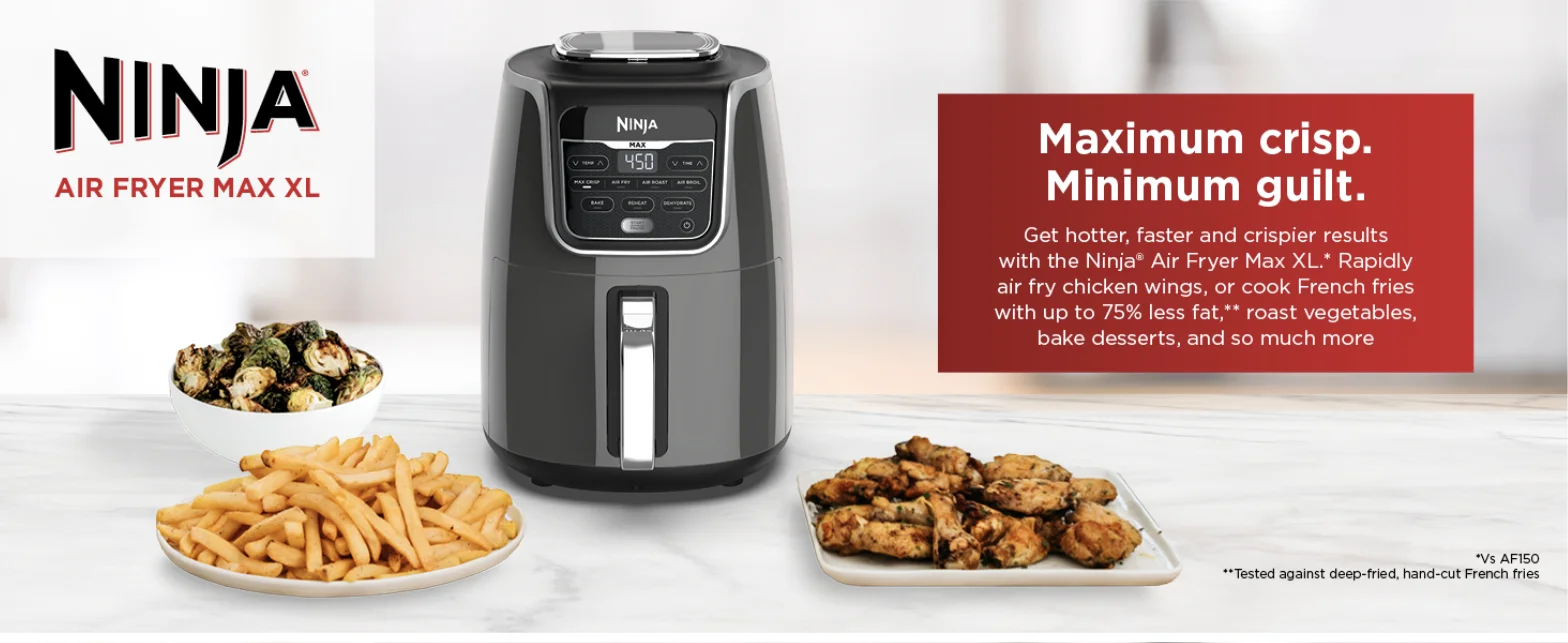
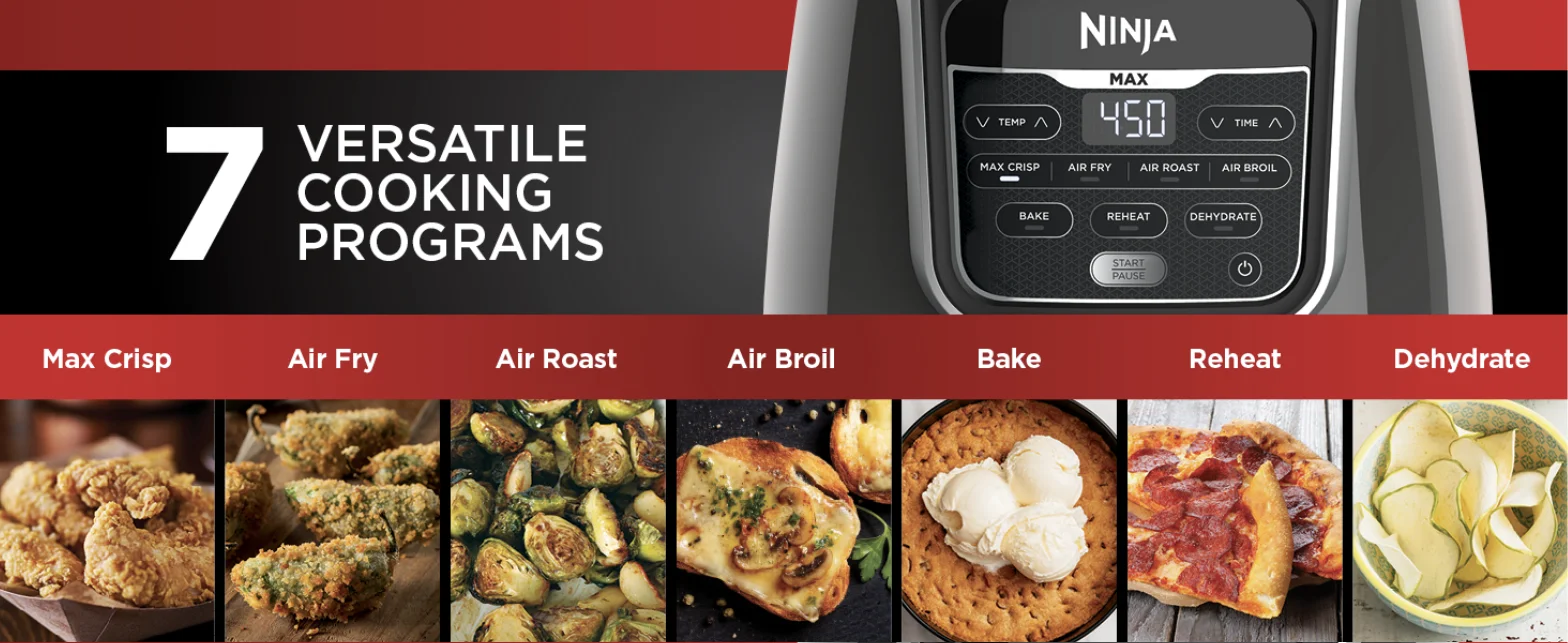
Feature panels. One panel per feature. The cooking programs panel names all seven, from Max Crisp to Dehydrate.
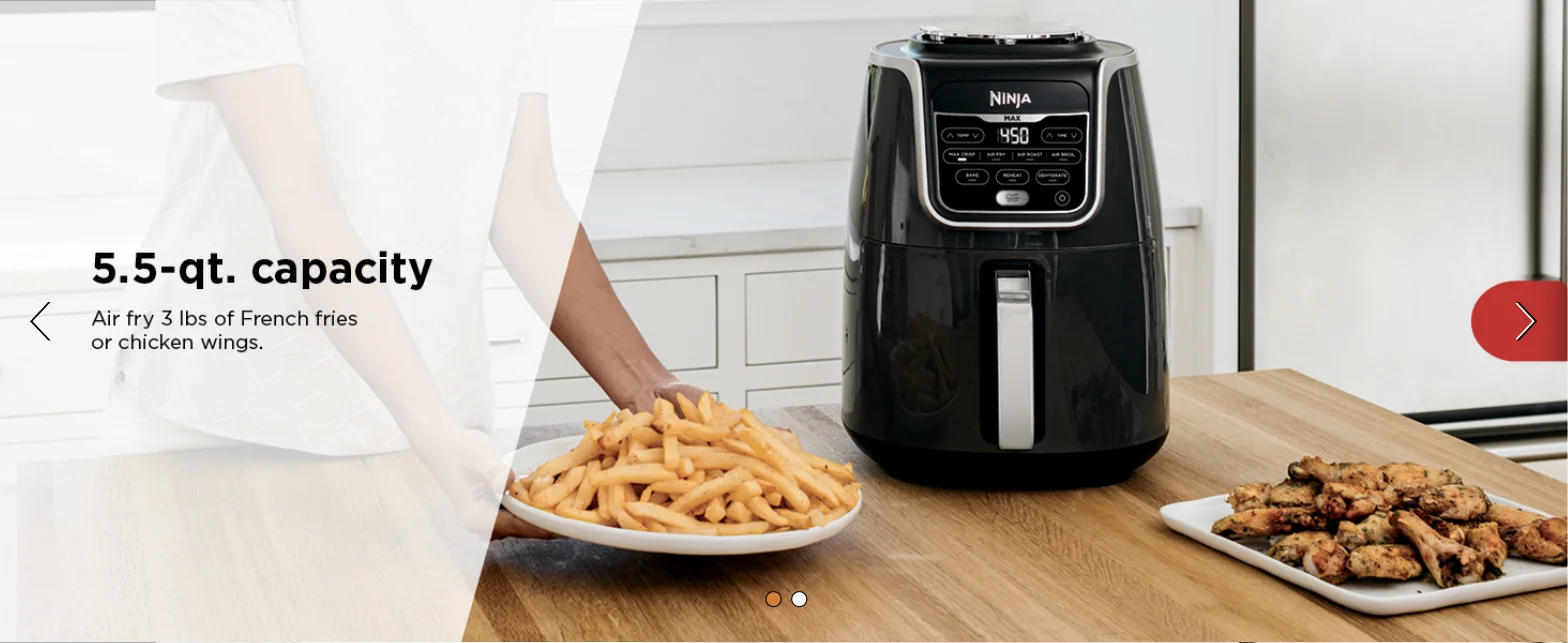
Other panels cover the 5.5-quart capacity and dishwasher-safe parts. The capacity panel sits in a carousel.
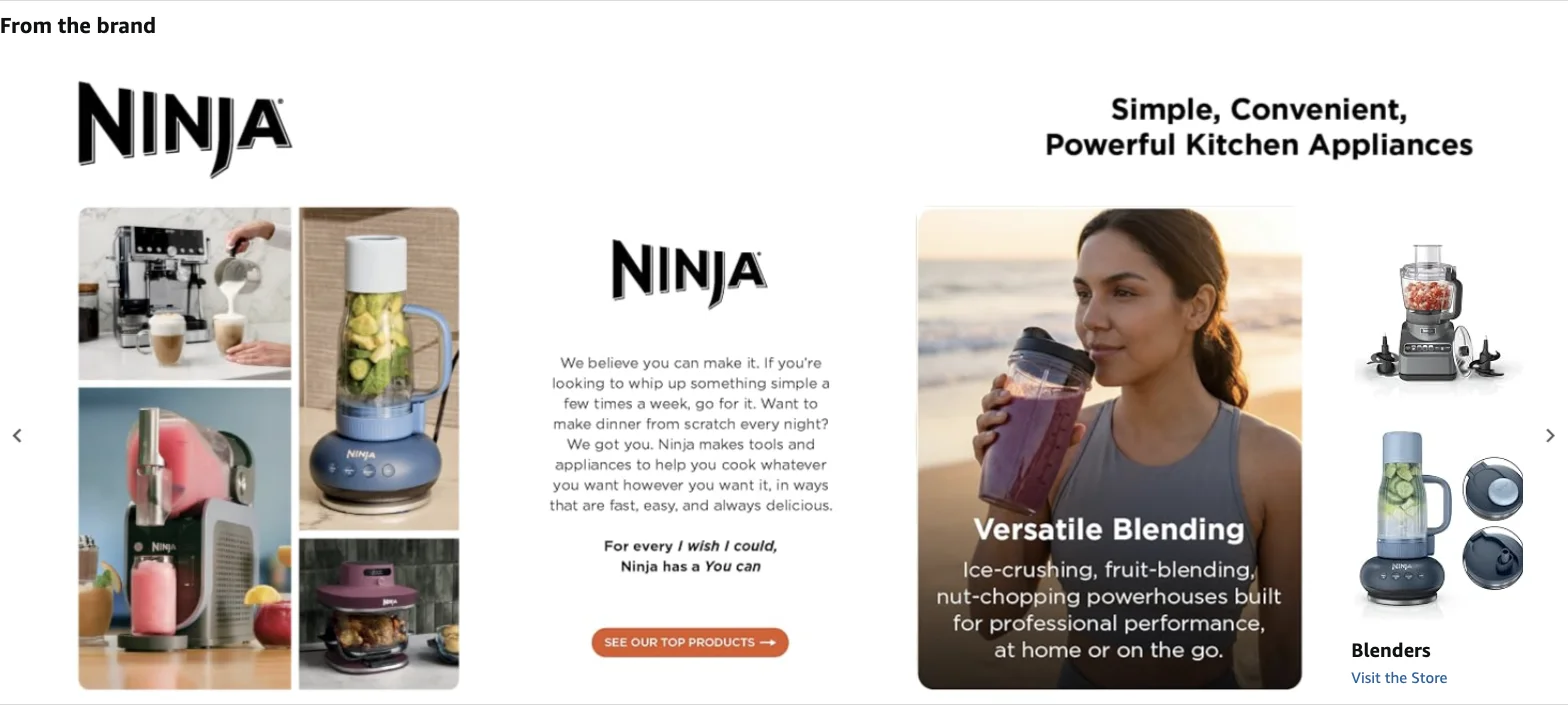
A brand story. A section shared across Ninja's listings, with the brand's story and links to its other categories.
Many brands also add a comparison chart that sets their models side by side, with one row per attribute.
Most of that material comes from product data. The cooking programs, capacity and dishwasher-safe parts are all attributes. If the product record says 5.5 quarts and a panel says 6, a shopper sees two different numbers on the same page.
The footnotes show the standard a claim needs to meet. "Up to 75% less fat" comes with the test behind it, and "hotter, faster and crispier" names the model it was compared against.
How does Amazon A+ Content work?
Amazon A+ Content lets eligible sellers add modules to the description section of their product pages. It comes in two levels, plus a brand-wide option:
- Basic A+ Content. Modules such as images with customized text placements, and shoppable product comparison charts.
- Premium A+ Content. Adds larger images, video, interactive hotspots, image or video carousels and Q&A modules.
- Brand Story. Shares the brand's story and values across all of its listings and links shoppers to its Amazon Brand Store.
To use it, a seller needs a Professional selling account and a Brand Representative or Reseller role for a brand enrolled in Amazon Brand Registry, or generic products in its catalog. Amazon says A+ Content is free for eligible sellers, and it can only be applied to brand-owned ASINs.
Every submission is reviewed, and only approved content appears on the product page. Brands with large catalogs can also create and submit content through Amazon's A+ Content API instead of building each page by hand.
A+ Content Manager also offers AI generation on modules marked "AI Ready". Treat that output as a first draft and check it against your product data before submitting.
Amazon says Basic A+ Content can increase sales by up to 8%, and well-implemented Premium A+ Content by up to 20%, based on its internal data. More on the rest of the listing in our Amazon listing optimization guide.
Who creates enhanced content, and who publishes it?
Creating and publishing are usually separate jobs. The brand's ecommerce or creative team plans the modules and produces the copy and images. Publishing depends on the retailer:
- Amazon. Brand owners publish through A+ Content Manager or the A+ Content API.
- Walmart. Sellers upload rich media through the Media Library in Seller Center.
- Best Buy. Content goes through the approved content partners listed in Best Buy's partner guide.
- Other retailers. Ask your buyer or vendor manager which route the retailer accepts.
How do you build enhanced content for a whole catalog?
Start with the products that sell most
A small share of products usually drives most of the revenue. Build for those first, then work through the rest of the catalog by collection.
Build modules at the right level
Brand modules are written once and reused on every product. Collection modules cover a product line, such as all of a brand's air fryers. Product-level modules are only needed where a product genuinely differs from its siblings. Reuse keeps the workload manageable and the message consistent.
Fill the attributes before you design
Comparison charts and callouts are only as complete as the attributes behind them. If one model is missing its basket capacity, the chart may have a blank cell. Fill those gaps through product data enrichment first, and the modules can be written from data you already trust.
Write once, adapt per retailer
Keep one approved version of each module's copy, then adapt the length and format to each retailer's module specs. When a product detail changes, update the source first, so every retailer version can be updated from it.
Check every module before submission
Before anything goes to a retailer, check each claim against the product's attributes and certifications, and check each image against that retailer's size and content rules. A rejected submission can delay the content, and a wrong claim that gets through can stay live until someone notices.
What rules do retailers apply to enhanced content?
- Review before publishing. Amazon reviews every A+ submission, and only approved content goes live. Walmart can unpublish rich media that violates its policies.
- Restricted categories. Walmart restricts rich media for certain product types, including alcohol, tobacco and firearms.
- AI-generated content. Walmart says AI-generated content "must be accurate, truthful, rights-compliant, and aligned with Marketplace policies."
- Claims need backing. A claim such as "BPA-free" in a module should match what the product data says, and any certification it mentions should be on record.
How do you measure whether enhanced content works?
Compare a product's conversion rate for the same length of time before and after the content goes live. Note any price changes or promotions in that window, since they move conversion too.
On Amazon, brand owners can use Manage Your Experiments to test two versions of content against each other on the same product. Return rates are worth watching as well. Walmart says rich media can reduce returns, and clearer details on the page can cut returns caused by a product not matching what the shopper expected.
How does Hypotenuse AI support enhanced content?
Hypotenuse AI handles the product data and content work behind enhanced content. Publishing stays with each retailer's own tool or approved content partner.
| Step | What Hypotenuse AI does |
|---|---|
| Fill the attributes behind charts and callouts | Fills missing attributes from the web, UPCs, product images and spec sheets. |
| Write module and feature copy at scale | Generates copy in bulk in any format you use, such as bullets or paragraphs, in your brand voice. |
| Amazon A+ copy | Creates A+ content alongside the rest of your Amazon listing copy. |
| Detail and lifestyle images | Generates detail shots and multiple lifestyle settings per product. |
| Size images per retailer | Applies channel sizing presets in bulk. |
| Check claims and images before submission | Turns retailer requirements into rules and checks copy and images against them. |
| Keep it all on one product record | Manages product data and content in one AI PIM. |
FAQs
Is enhanced content the same as A+ Content?
A+ Content is Amazon's name for enhanced content. Other retailers use their own names, such as rich media on Walmart.
Is Amazon A+ Content free?
Yes, for sellers who meet Amazon's eligibility requirements.
What is the difference between enhanced content and rich media?
Rich media usually means the media elements themselves, such as video or 360-degree spins. Walmart also uses "rich media" as its name for enhanced content as a whole.
Can you use AI to create enhanced content?
Yes. Amazon offers AI generation on some A+ modules, and Walmart allows AI-generated content as long as it is accurate and follows its policies. Check AI output against your product data before submitting.




.avif)